Paper logs make this harder than it should be. Missed entries, illegible handwriting, and forgotten weekend checks are common, yet CDC and VFC auditors expect a complete, defensible record for every storage unit you operate.
This guide walks through the correct Fahrenheit range, how to fill out a refrigerator log sheet correctly, what VFC compliance actually requires, and how automated data loggers replace error-prone manual tracking.
Key Takeaways
- Vaccine refrigerators must stay between 36°F and 46°F, targeting a 40–41°F midpoint
- Digital temperature monitoring has been CDC-recommended since 2012 and VFC-required since 2018
- Logs and printouts need 3+ years retention (longer in some states)
- Software-free digital loggers cut transcription errors and speed up audits
- Any out-of-range reading demands immediate, documented corrective action
What Is a Vaccine Temperature Log and Why It's Required
A vaccine temperature log is a daily written or digital record proving your vaccines stayed within a safe temperature band, every hour, every day. Vaccines for Children (VFC) program enrollment depends on it, and state health department auditors will ask to see it during both scheduled and surprise visits.
The stakes are real. A 2012 Office of Inspector General study found that 76% of 45 selected VFC providers exposed stored vaccines to inappropriate temperatures for at least five cumulative hours during a two-week monitoring period. That finding pushed CDC and VFC toward the stricter monitoring rules in place today (OIG report OEI-04-10-00430).
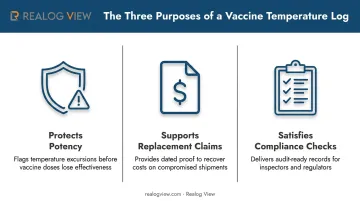
The log serves three practical purposes:
- Protects potency by creating an early-warning trail before a small drift becomes a full excursion
- Supports replacement claims with manufacturers when a documented excursion damages inventory
- Satisfies compliance checks during VFC site visits, whether announced or not
Standard Fields on a Fahrenheit Log
CDC and Immunization Action Coalition (IAC) templates share a common structure:
| Field | Purpose |
|---|---|
| Facility name & VFC PIN/ID | Identifies the site and program enrollment |
| Month/year | Establishes the reporting period |
| Staff initials & time | Creates accountability for each reading |
| Current temp + min/max | Shows real-time status and range since last check |
| Room temperature | Flags ambient conditions affecting the unit |
| Action section | Documents corrective steps for excursions |
Refrigerators and freezers each need their own log sheet. Their acceptable ranges and danger thresholds differ enough that combining them invites confusion during a fast-moving excursion.
Ideal Refrigerator Temperature Range in Fahrenheit
The standard vaccine refrigerator range is 36°F to 46°F (2°C to 8°C), with 40–41°F recommended as the target to build in a buffer before either boundary is breached (CDC Vaccine Storage and Handling Toolkit).
For comparison, freezer requirements look very different:
| Storage type | Fahrenheit range |
|---|---|
| Refrigerator | 36°F to 46°F |
| Standard freezer | -58°F to +5°F |
| Ultra-cold freezer | -130°F to -76°F |
The gap between these ranges has real clinical consequences. Too warm conditions accelerate potency loss in heat-sensitive vaccines, sometimes within hours, while too cold conditions can freeze liquid or adjuvanted vaccines, destroying them permanently and irreversibly.
Documentation Frequency
Log temperatures once daily (preferably each morning) if your temperature monitoring device (TMD) has min/max memory, since it already captured any overnight excursion. Without that recall, log twice daily—at opening and closing—so no swing goes unrecorded. Data loggers with automatic min/max capture, like those from Realog View, cut this manual step by generating a PDF report on demand.
Most log sheets shade the danger zones above 46°F and below 36°F in a different color, so a quick glance flags any out-of-range reading right away. That visual cue can be the difference between catching an excursion in minutes versus discovering it a day later.
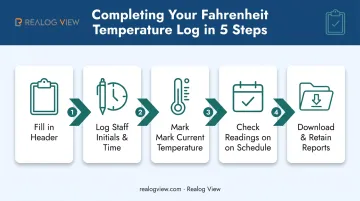
How to Complete Your Fahrenheit Refrigerator Temperature Log Step-by-Step
Filling out the log correctly takes less time than most staff expect once the routine is set.
- Fill in the header: facility name, VFC PIN/ID number, and month/year, before recording a single reading for that sheet
- Log staff initials and exact time for every check, creating a clear chain of accountability
- Mark current temperature with an X in the matching row, and record min/max since the last reading if your device captures it
- Check readings on schedule — twice per workday for basic thermometers, once daily for TMDs with automatic min/max capture
- Download and print data logger reports periodically, attaching them to the paper log, and retain the combined record for at least three years
What to Do During a Temperature Excursion
Stay calm during an excursion, but act immediately and document everything.
- Label the exposed vaccine "Do Not Use," and move it into proper storage. Never discard vaccine on your own judgment
- Record the out-of-range reading and room temperature in the log's Action section, and notify your vaccine coordinator or state immunization program immediately
- Complete a Vaccine Storage Troubleshooting Record detailing the corrective action taken. Auditors routinely ask for this alongside the temperature log itself
Manual Logs vs. Automated Digital Data Loggers
Handwritten logs have real limitations:
- Missed readings during busy shifts or weekends
- Illegible handwriting that creates disputes during audits
- No automatic alarm if temperatures drift outside range overnight
- Zero visibility into brief fluctuations between check-ins
Digital data loggers close every one of those gaps by recording continuously, not just at check-in times. This shift isn't optional guidance anymore. CDC has recommended continuous digital monitoring since 2012, and VFC has required these devices for federally funded vaccine storage units since 2018.
This is where hardware choice actually matters. Realog View's data loggers are built software-free: connect the device by USB, and it automatically generates an FDA 21 CFR Part 11 compliant PDF and CSV report, no external software or drivers needed. That matters for two reasons.
- No transcription errors: the report pulls straight from the device's internal record, not a staff member's memory
- Audit-ready output: the PDF format gives inspectors a tamper-evident record instead of a handwritten sheet they have to interpret
For a VFC provider juggling multiple units, that's the difference between spending an afternoon reconstructing records before an inspection and simply printing what the device already captured.
VFC Compliance Requirements for Temperature Monitoring Devices
VFC sets specific minimum specifications for continuous monitoring devices used on federally funded vaccine inventory (CDC VFC Operations Guide):
- Accuracy of ±1°F or better
- Logging interval of 30 minutes or less
- Storage capacity of at least 4,000 readings
- Buffered probe to simulate the thermal mass inside a vaccine vial
- External display for at-a-glance current temperature
- Visual or audible alarm for excursions
Realog View's multi-use loggers are designed to meet or exceed several of these benchmarks. Accuracy stays well inside the ±1°F minimum, and storage capacity on multi-use models extends far beyond the 4,000-reading floor.
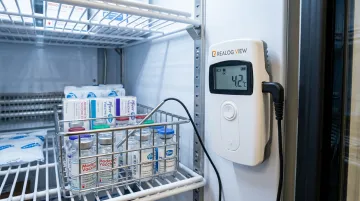
Logging intervals are fully user-configurable, so you can dial in 30 minutes or tighter. The IP67 rating also holds up well against refrigerator condensation, which matters more than people expect in a unit that opens and closes dozens of times a day.
Two specifics are worth confirming directly with your VFC coordinator before deployment: Realog View's loggers use an internal sensor rather than a probe buffered in glycol or similar material, and alarms are visual (LED or LCD bell icon) rather than audible. Neither is uncommon among compliant devices, but your program may have its own preference.
Calibration and Retention
- Keep a current certificate of calibration on file for every device in use
- Recalibrate every 1–2 years, or per the manufacturer's stated schedule
- Maintain a backup device on-site in case your primary logger fails
- Retain logs and printouts for a minimum of 3 years, longer if your state requires it
Frequently Asked Questions
How often should VFC temperature logs be completed?
Manual logs typically need readings twice daily, morning and evening. Devices with min/max memory only require one documented check per day, ideally in the morning.
What temperature should a VFC freezer be kept at?
Freezer ranges commonly run from 5°F down to -58°F depending on the vaccine type stored. Always confirm the exact range against manufacturer packaging and CDC storage charts for your specific inventory.
Where can I find VFC temperature log sheets?
CDC's Vaccine Storage and Handling Toolkit and the Immunization Action Coalition both publish downloadable Fahrenheit log templates. Many state health departments also provide their own versions, sometimes with additional required fields.
What should I do if my vaccine refrigerator temperature is out of range?
Label the exposed vaccine "Do Not Use," document the reading in the log's Action section, and notify your immunization program immediately. Don't discard any vaccine until you've received guidance.
How long should vaccine temperature logs be kept?
Three years is the standard minimum retention period. Some states, including Texas, require records to be kept for five years, so check your local rules.
Can a digital data logger replace manual temperature logs?
Yes. Compliant data loggers, such as Realog View's FDA 21 CFR Part 11 models, satisfy VFC documentation requirements and typically exceed them, automating readings and reports. Providers still need to review and retain that data monthly, just as they would a paper log.