HACCP temperature logs exist to prevent exactly that scenario. They're the record proving food, pharmaceuticals, and biologics stayed within safe temperature ranges at every stage of handling.
Many operations still rely on handwritten logs, and the pain points show up fast: forgotten entries, illegible handwriting, and gaps that only surface during an inspection.
This guide covers what HACCP temperature logs actually require, the critical limits behind them, how often checks need to happen, and how digital monitoring is changing what "compliant" looks like.
Key Takeaways
- HACCP logs record temperature at every critical control point to prove compliance
- Complete entries include temperature, time, date, product ID, initials, and corrective action
- Check frequency runs every 2-4 hours, more often for high-risk TCS foods
- Digital loggers eliminate human error and auto-generate audit-ready PDF/CSV reports
- Retention rules range from 30 days to a year or more, depending on jurisdiction
What Are HACCP Temperature Logs?
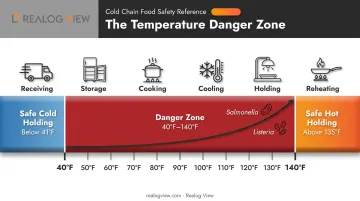
HACCP temperature logs are systematic records documenting temperature readings at critical control points, the specific steps in a process where a food safety hazard can be prevented, reduced, or eliminated. Under a Hazard Analysis and Critical Control Points system, those checkpoints typically include receiving, storage, cooking, cooling, holding, and reheating.
Each entry builds a timeline. Read together, the logs prove that a product never sat in an unsafe temperature range long enough for pathogens to multiply. That timeline is the backbone of any HACCP plan, and it's usually the first document an inspector asks to see.
Why Temperature Dominates HACCP Plans
Temperature is one of the most commonly monitored CCPs because it's measurable, fast to check, and directly tied to bacterial growth. Pathogens like Salmonella and Listeria multiply rapidly between 40°F and 140°F, the range food safety professionals call the danger zone.
Time and temperature abuse is a leading cause of foodborne illness, which is exactly why nearly every HACCP plan builds a critical limit around it.
A single missed check can turn into spoiled inventory, a failed audit, or a costly, brand-damaging recall. The equipment recording those readings needs to be reliable enough to quickly catch a deviation the moment it happens.
Industries Beyond Restaurants
Food service gets most of the attention, but temperature logs matter just as much in:
- Pharmaceutical cold chain and vaccine storage, where a few degrees of drift can destroy potency
- Laboratories handling temperature-sensitive samples and reagents
- Industrial cold storage and warehousing operations
- Biologics and medical sample transport
A vaccine shipment sitting four hours above the required range is functionally the same failure as a chicken breast left in the danger zone too long. The product may need to be discarded, and someone has to prove what happened.
Temperature logs also serve as legal evidence. If a customer gets sick, an insurer questions a claim, or a regulator opens an investigation, a complete, timestamped log is the strongest proof your team followed procedure. Gaps in the record don't just fail an audit, they leave a business with nothing to point to.
Are HACCP Temperature Logs Required?
HACCP itself isn't mandatory for every food business. Federal law requires a written plan for specific high-risk categories, but most restaurants fall under a different set of rules entirely.
| Sector | Federal Requirement |
|---|---|
| Seafood processing | Written HACCP plan required when a hazard is reasonably likely (21 CFR Part 123) |
| Juice processing | Written HACCP plan required under 21 CFR Part 120 (retail excluded) |
| Meat & poultry | Written HACCP plan required under 9 CFR Part 417 |
| Restaurants & retail | Governed by whatever local code the jurisdiction adopted, not a blanket federal mandate |
For restaurants, whether a temperature log is legally required comes down to your local health department's adopted food code, plus any conditions tied to your permit or an approved variance.
Pharma, biologics, and cold chain logistics face a stricter bar. FDA 21 CFR Part 11 governs electronic records for these industries, requiring:
- Validated systems that generate accurate, reproducible readings
- Secure audit trails documenting every data point
- Tamper-evident records that can't be edited after the fact
Realog View's data loggers meet this standard, generating FDA 21 CFR Part 11 compliant PDF and CSV reports automatically without external software.
Even where the law doesn't explicitly demand a log, insurers and auditors increasingly expect one anyway. Documented temperature monitoring has become the default proof of operational risk management. Skipping it just because it isn't technically mandated is a bet most operators can't afford to make.
HACCP Temperature Guidelines and Critical Limits
The temperature danger zone sits between 41°F and 135°F (5°C to 57°C). Bacteria multiply fastest in this range, which is why every HACCP plan is built around moving food out of it as quickly as possible.
According to the FDA Food Code, cold TCS food must stay at 41°F or below, while hot TCS food must stay at 135°F or above. Nearly everything else in a HACCP plan flows from those two numbers.
| Stage | Requirement |
|---|---|
| Cold holding | 41°F (5°C) or below |
| Hot holding | 135°F (57°C) or above |
| Fish, intact meat, shell eggs (immediate service) | 145°F for 15 seconds |
| Ground meat, non-intact meat, comminuted fish | 155°F for 17 seconds |
| Poultry, stuffed items, wild game | 165°F for under 1 second |
| Reheating for hot holding | 165°F for 15 seconds, within 2 hours |
The Two-Stage Cooling Rule
Cooked food needs to cool fast enough to avoid regrowth: from 135°F to 70°F within 2 hours, then from 70°F to 41°F within an additional 4 hours (6 hours total). Miss either window, and the batch typically gets tossed. That's exactly why cooling logs track both midpoints, not just the final temperature.
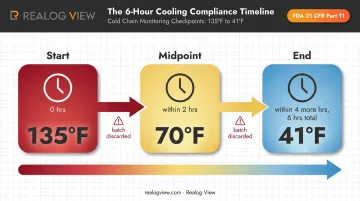
Continuous data loggers that automatically generate PDF records make this two-stage check easier to document than manual spot-checks alone.
Pharmaceutical and Cryogenic Ranges
Food safety limits don't stretch far enough for pharma and biologics. Vaccine storage guidance generally calls for:
- Refrigerators: 2°C to 8°C (36°F to 46°F)
- Standard freezers: -50°C to -15°C
- Ultra-cold freezers: as low as -90°C to -60°C for certain products
These tighter windows call for dedicated monitoring equipment, since even a brief excursion outside 2-8°C can compromise potency.
Cryogenic storage pushes further still, with some biologics requiring stable conditions below -70°C. Add pasteurization and sterilization on the opposite end, often above 121°C for autoclave cycles, and a single operation may need monitoring gear spanning well over 200 degrees of range. Data loggers rated from -85°C to +140°C can cover that entire span in a single device.
How Often Should You Complete HACCP Temperature Logs?
Most food safety programs call for checks every 2 to 4 hours during active service, with higher-risk TCS (Time/Temperature Control for Safety) items needing closer attention. But frequency ultimately depends on the specific critical control point, not one blanket rule.
USDA guidance for school food service breaks it down by activity: staff record refrigeration temperatures at least three times daily and check hot and cold holding at least every two hours. Cooling logs need checkpoints tight enough to catch a problem before the 2-hour and 6-hour deadlines close, so many operators check around the 1.5-hour mark to leave room for corrective action.
Frequency by CCP:
- Receiving: logged per delivery, at the dock
- Storage: checked per shift, often 2-3 times daily
- Cooking: monitored per batch against the required internal temperature
- Cooling: checked at both the 2-hour and 6-hour milestones
- Holding: roughly every 2 hours during service
- Reheating: at least two readings per pan, logged with time
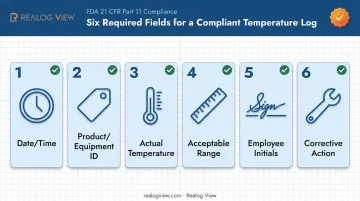
Every complete log entry needs six fields:
- Date and time of the check
- Product or equipment identifier
- Actual temperature reading
- Acceptable range for comparison
- Employee initials
- Corrective action taken, if the reading fell outside range
What a Restaurant-Ready Log Book Needs
A log book that survives an inspection isn't just a grid of blank boxes. Look for:
- Pre-printed acceptable ranges for each piece of equipment, so staff aren't guessing
- Dedicated space for corrective actions, not just a pass/fail checkbox
- Columns organized by shift or meal period, matching how the kitchen actually runs
Pair that log book with calibration records and a supervisor sign-off section. Automated temperature data loggers can complement this process by capturing readings continuously and generating time-stamped PDF or CSV reports, cutting down on manual entry errors. Inspectors still look for both the temperature data and proof that someone reviewed it. A log without a verification signature raises questions about whether anyone was actually watching.
Manual Log Books vs Automated Temperature Data Loggers
Handwritten logs have one thing going for them: they're cheap and need no technology. That's also their weakness. A busy shift means someone forgets the 2 PM check, writes down an estimate instead of an actual reading, or scribbles something illegible a supervisor can't verify weeks later.
Automated data loggers remove that dependency entirely. Instead of relying on staff to remember a check every two hours, the device records temperature continuously, whether anyone's in the room or not.
A CDC-hosted Monte Carlo simulation using real data from 243 vaccine storage units found that twice-daily spot checks without min/max tracking missed excursions at rates between 4.8% and 6.4%, compared to continuous digital logging that caught them all.
How Realog View's Loggers Fit In
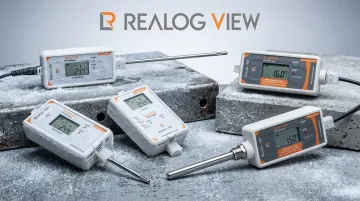
Realog View's TempTrail data loggers work as a software-free alternative to the clipboard. They record temperature, and on some models humidity, continuously at a set interval.
The device then generates an FDA 21 CFR Part 11 compliant PDF and CSV report automatically the moment it connects to a computer over USB. No app, no external probe, and no manual transcription step where a number can get copied wrong or backdated.
The product line covers a wide span:
- Standard/cold chain models: -30°C to +70°C, suited to walk-in coolers and refrigerated transport
- TempTrail Glacial (ultra-low/cryo): -85°C to +70°C, built for dry ice shipments and cryogenic biologics
- TempTrail HiTemp: +5°C to +140°C, for autoclave validation and cooking or sterilization monitoring
All models ship in IP67 or IP68 sealed housings, so internal memory can't be opened or edited without visibly damaging the device. Combined with 21 CFR Part 11 compliance, that sealed design is what makes the resulting report genuinely tamper-proof. A spreadsheet cell can be edited after the fact with no trace. Data sealed inside a logger that has already generated its report cannot be changed without visibly damaging the housing.
That tamper-proofing comes at a price, though. Paper logs still cost less upfront and don't fail during a power outage. Digital loggers cost more per unit but remove the single biggest cause of incomplete HACCP records: a person simply forgetting to write something down.
Best Practices for Maintaining Audit-Ready HACCP Logs
Even a great log book fails if nobody owns it. A few habits separate audit-ready operations from ones scrambling before an inspection:
- Assign a specific person to each log. "Someone will check the walk-in" is how entries get skipped. Name a person per shift, per log.
- Build in supervisor review. A manager should scan logs at the close of each shift, not just when an inspector asks for them.
- Calibrate thermometers and loggers on a schedule. Check weekly, and again after any drop or extreme swing, then file the calibration record with the temperature log.
- Document the actual reading, not just a checkmark. A box marked "pass" tells an inspector nothing; the real number, the corrective action, and who verified it tell the whole story.
None of this is complicated, but it's exactly the routine that slips when a kitchen or warehouse gets busy. Loggers that generate PDF or CSV reports automatically, like Realog View's, remove some of that risk by capturing the reading itself instead of leaving it to a manual entry. Operations that pass audits without drama treat these steps as non-negotiable from day one, not something added after a failed inspection.
Frequently Asked Questions
How often should HACCP temperature logs be completed?
Most checks happen every 2-4 hours during operating hours, with higher-risk TCS foods (Time/Temperature Control for Safety) needing closer attention. Exact frequency depends on the specific CCP, the food type, and your local health code.
Are HACCP temperature logs required?
Requirements vary by industry and location. Local health codes generally govern food service, while pharma and cold chain operations face stricter federal rules like FDA 21 CFR Part 11.
What are the HACCP food temperature guidelines?
Keep cold food at 41°F or below and hot food at 135°F or above, avoiding the danger zone in between. Cooling must move from 135°F to 70°F within 2 hours, then to 41°F within 4 more hours.
What is a good HACCP temperature log book for a restaurant?
Look for pre-printed acceptable ranges per piece of equipment, dedicated corrective-action fields, and a supervisor sign-off section. These are the features inspectors expect to see.
How long should HACCP temperature logs be kept?
Retention ranges from 30 days to a year or more, depending on your jurisdiction and product type. Confirm the exact period with your local health department.
Can digital temperature data loggers replace manual HACCP logs?
Yes, when the logger generates compliant, tamper-proof records like a 21 CFR Part 11 PDF report. Some operations still keep paper as a backup in case of a power or system outage.