Key Takeaways
- Automated report generation eliminates manual data compilation, reducing errors and freeing teams for higher-value work
- Hardware-based data loggers generate compliance-ready PDF and CSV reports directly on-device, with no external software needed
- FDA 21 CFR Part 11 compliance, timestamped records, and tamper-proof design are essential for regulated industries
- Pharmaceutical, cold chain, food safety, and laboratory sectors depend most heavily on automated reporting for audit readiness
- Clean source data is the foundation: automation amplifies what's already there, but cannot correct flawed inputs
What Is Automated Report Generation?
Automated report generation is the process of collecting, processing, and delivering structured reports from data sources without manual intervention. Rather than someone manually compiling spreadsheets or transcribing measurements, the system handles everything: pulling data, formatting it, and producing a finished document on a schedule or in response to a trigger event.
Two distinct approaches serve different operational needs — and the gap between them is significant:
Software-based reporting uses business intelligence platforms like Power BI, Tableau, and Looker Studio to aggregate data from multiple sources. These tools excel at multi-site analytics, trend visualization, and executive reporting — but they require network infrastructure, subscriptions, and IT support.
Hardware-based reporting embeds the reporting logic directly in the device. Realogview's TempTrail data loggers, for example, automatically produce FDA 21 CFR Part 11-compliant PDF and CSV reports the moment they connect to a computer via USB. No external software, no cloud connection, no drivers required.
| Feature | Hardware-Based (Data Loggers) | Software-Based BI Platforms |
|---|---|---|
| Report trigger | USB connection | Scheduled or on-demand |
| Infrastructure needed | Basic Windows PC | Server, cloud, or installed software |
| Internet dependency | None | Often required |
| Compliance focus | Built-in (FDA 21 CFR Part 11) | Depends on configuration |
| Deployment | Plug-and-play | Requires setup and training |
| Best for | Field, transit, regulated environments | Centralized, multi-source analytics |
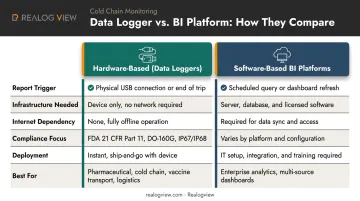
The right approach depends on operational context. A pharmaceutical cold chain shipment needs hardware-embedded reporting; a finance team running month-end close analysis needs a BI platform.
Key Benefits of Automated Report Generation
Accuracy and Regulatory Compliance
Manual data entry introduces errors at every stage. A 2023 clinical research review covering 84 manuscripts found database error rates ranging from 2 to 2,784 errors per 10,000 fields depending on method, with medical-record abstraction producing a pooled 6.57% error rate. In regulated industries, those errors aren't just operational problems — they're compliance failures.
Automated systems remove the human hand from transcription entirely. The data captured by a sensor goes directly into the report without passing through manual handling. For audit-sensitive environments, regulators require demonstrable, traceable accuracy — not just accurate data in isolation. An automated chain of custody from sensor to report satisfies both requirements.
Time Savings Across Reporting Workflows
Automation's time impact varies by workflow. BCI (British Columbia Investment Management Corporation) reported a 30% reduction in writing effort for internal audit reports using AI-assisted compilation, while McKinsey documented early pilots of generative AI-assisted clinical-study-report authoring that cut end-to-end cycle time by 40%. These are case-specific results — but they illustrate where the gains tend to appear: document-heavy, repetitive reporting workflows.
Real-Time vs. Scheduled Delivery
Two delivery models serve different needs:
- Real-time dashboards — suited for operational monitoring, where decisions need to happen immediately (temperature excursions, production deviations)
- Scheduled reports — better for executive reviews, regulatory submissions, and periodic compliance documentation
For hardware-based solutions, the trigger is typically event-driven (USB connection, shipment completion) rather than time-scheduled — but the result is the same: the right data reaches the right person at the right moment.
Scalability Without Proportional Labor Costs
As reporting volume grows — more shipments, more monitoring points, more regulatory submissions — automated systems absorb the increase without adding headcount. Consider a practical example:
- 50 shipments/month → manageable with a small compliance team
- 500 shipments/month → same team, same workload, same turnaround time
- 5,000 shipments/month → still no proportional increase in staff or documentation overhead
The labor cost stays flat. The reporting output scales with the operation.
How Automated Report Generation Works
Step 1 — Data Collection
Every reliable automated report starts with clean, consistent data at the source. For hardware-based systems, this means integrated sensors capturing readings directly into onboard memory at defined intervals.
Realogview's TempTrail loggers use embedded temperature (and where applicable, humidity) sensors that record continuously throughout the monitoring period. Storage capacity ranges from 11,000 data points on the TempTrail Classic to 32,000 data points on models like the TempTrail XL, Display, Glacial, and HiTemp. At a standard 10-minute logging interval, 32,000 data points covers up to 220 days of continuous monitoring.
The data never leaves the device until retrieval — no network transmission, no intermediate software layer.
Step 2 — On-Device Processing and Validation
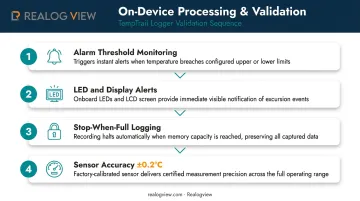
Raw readings don't go straight into the report unexamined. TempTrail loggers perform on-device validation at the hardware level:
- Alarm threshold monitoring — Every reading is evaluated against pre-set or user-configured upper and lower limits in real time. A threshold breach triggers the alarm immediately — not during report generation
- LED and display alerts — Alarm violations surface on-device through red LED indicators or LCD display alerts, giving receiving staff an instant pass/fail signal before any computer connection
- Stop-when-full logging — Data is preserved sequentially without overwriting, maintaining a complete, unaltered chronological record
- Sensor accuracy — All TempTrail models deliver ±0.2°C accuracy with 0.1°C resolution, establishing hardware-level data quality at the point of capture
Step 3 — Report Formatting and Output
When a TempTrail logger is connected to a Windows PC (Windows 7 or higher, Adobe Reader 9.0 or higher), the device automatically generates a PDF report and CSV file with no manual export steps and no software installation.
The PDF serves as the primary compliance document: human-readable, audit-ready, and structured to meet FDA 21 CFR Part 11 requirements for electronic records. The CSV supports further analysis and integrates directly into quality management systems or HACCP documentation workflows.
Report templates are standardized across the product line — a deliberate choice for regulated environments where consistent, predictable output matters more than formatting flexibility. For organizations needing custom report structures, the ReaLog View Analytical Software includes a Custom Report module.
Step 4 — Distribution and Access
Once generated, the PDF can be shared immediately with quality teams, regulatory bodies, customers, or logistics partners. Recipients need no special software to open or review it, which matters when reports must reach contacts outside the organization.
Multi-use models can be reconfigured after each deployment cycle; single-use models ship fresh with the next consignment.
Data governance across every stage:
- FDA 21 CFR Part 11 compliance ensures electronic records are secure and tamper-evident
- IP67/IP68-rated tamper-proof casings protect physical data integrity
- DO-160G certification validates hardware reliability under extreme environmental conditions
- Time-stamped, sequential data recording creates a verifiable chain from source measurement to final report
Industry Applications: Where Automated Reporting Delivers Real Value
Pharmaceutical and Cold Chain
This is where automated reporting is most non-negotiable. Pharmaceutical cold chains operate under strict regulatory scrutiny — FDA 21 CFR Part 11 requires electronic records to be secure, traceable, and protected against alteration. Temperature excursions during transit or storage can compromise entire product batches.
CDC guidance specifies that vaccine digital data loggers should record at least every 30 minutes and retain temperature records for three years. WHO's equipment catalog lists standalone devices that automatically generate PDF evaluation reports on-device, confirming the value of on-device automatic reporting.
Realogview's TempTrail models cover this full compliance range:
- TempTrail Glacial (–85°C to +70°C) — ultra-low temperature biologics, dry ice shipments, cryogenic storage
- TempTrail Display (–30°C to +70°C) — standard refrigerated pharmaceutical transport
Both generate compliant PDF and CSV reports automatically, with no external software required.
Food Processing and Warehouse Monitoring
Federal HACCP rules require records of actual critical control point values and observations. FDA guidance notes that continuous monitoring is preferred when feasible, with continuous time-temperature recording cited as the ideal for certain food processes.
Realogview models map directly to these requirements:
- TempTrail HiTemp (IP68, +5°C to +140°C) — cooking, pasteurization, and sterilization monitoring
- TempTrail Display and Humidity & Display — warehouse environmental conditions
Alarm violation records in the auto-generated reports support the deviation documentation HACCP compliance requires.
Healthcare and Laboratory Facilities
CLIA regulations require laboratories to define, monitor, and document storage and operating conditions including temperature and humidity. CMS accepts continuous computer monitoring when readings are electronically recorded.
TempTrail models deployed in lab settings — particularly the Glacial series for cryogenic storage and the HiTemp for autoclave validation — eliminate manual documentation burden while producing the traceable electronic records CLIA and similar standards require.
Operations and Logistics
The same efficiency logic applies across operations and logistics teams. APQC benchmarks the median monthly reporting cycle at 6.0 calendar days — organizations that remove manual steps from the reporting chain consistently beat that figure. For cold chain and warehouse managers, hardware-level automation serves the same purpose: every manual data transfer eliminated is a potential error and delay removed from the compliance workflow.
How to Implement Automated Reporting
Follow these three steps to move from manual reporting to a reliable automated system.
1. Define Reporting Goals First
Start by identifying which reports consume the most time, arrive too late to be useful, or are most frequently requested. Those are the candidates for initial automation — not the edge cases.
2. Select the Right Approach for Your Context
- Software-based platforms (Power BI, Tableau, Looker Studio) — best for multi-source business analytics, large datasets, and custom visualization
- Hardware-embedded solutions — best for field environments, regulated industries, cold chain transit, or contexts where simplicity and compliance outweigh analytical flexibility
For organizations in pharmaceutical, food safety, or cold chain logistics, the hardware approach eliminates the need for software, servers, or IT setup. A TempTrail logger requires nothing more than a USB port to produce a compliance-ready report.
3. Validate, Distribute, and Iterate
Before full deployment:
- Test reports against source data to confirm accuracy
- Establish governance — who can configure devices, who receives reports, who reviews deviations
- For multi-use loggers, define reconfiguration protocols between deployment cycles
- Refine alarm thresholds and logging intervals based on real-world performance
Once these steps are in place, your automated reporting system is ready to run with minimal oversight — and consistent, audit-ready output.
Challenges and How to Overcome Them
Data quality and integration complexity Poor source data produces flawed reports, regardless of how sophisticated the automation is. Gartner estimates poor data quality costs organizations at least $12.9M annually on average. Regular data validation, pipeline monitoring, and — for hardware systems — sensor calibration checks are essential safeguards that cannot be skipped.
Data security and compliance risks Automated systems that handle sensitive data need proper controls:
- Role-based access for who can configure, retrieve, or modify reports
- Audit logging for record access and changes
- Physical tamper-resistance for hardware systems (IP67/IP68 sealing)
- Compliance alignment with applicable regulations (GDPR, HIPAA, FDA 21 CFR Part 11)
User adoption and change management Even the most technically sound automated reporting system fails if teams don't trust or use it consistently. Three practices accelerate buy-in:
- Start with high-visibility reports where time savings are immediate and obvious
- Involve end users in setup so the system reflects how they actually work
- Provide clear documentation so staff can troubleshoot without escalating
Teams that see a direct reduction in manual effort — fewer hours spent compiling compliance reports, for instance — carry that momentum into broader adoption.
Frequently Asked Questions
What is automated report generation?
Automated report generation is the process of collecting and presenting data in structured report formats without manual compilation. Systems use software platforms, APIs, or embedded device firmware to trigger report creation on a schedule or in response to an event — such as USB connection for hardware data loggers.
What is the best tool for automated report generation?
The right tool depends entirely on use case. Power BI, Tableau, and Looker Studio suit business intelligence and multi-source analytics. For regulated or field environments such as pharmaceutical cold chain, food safety, and laboratory monitoring, hardware-embedded solutions that generate compliant reports on-device without additional software are the more practical choice.
How does automated reporting support regulatory compliance?
Automated systems produce consistent, timestamped, tamper-resistant records with full data integrity controls: a requirement for FDA 21 CFR Part 11, HACCP, GDPR, and HIPAA compliance, where traceability from data capture to final document is mandatory.
Can automated reports be generated without external software?
Yes. Hardware-based data loggers like Realogview's TempTrail series generate PDF and CSV reports directly on the device when connected via USB — no external software, drivers, or cloud connection required.
What industries benefit most from automated report generation?
Pharmaceutical, cold chain logistics, food processing, healthcare, laboratory, and financial services organizations benefit most, particularly where accuracy, timeliness, and regulatory traceability are non-negotiable operational requirements.
How does automated reporting improve data accuracy?
By removing manual data entry and transcription from the reporting process, automated systems eliminate the primary source of human error — producing standardized outputs directly from the data source with no intermediate handling that could introduce mistakes.